
Before you start
- Set up your company GSTIN and state, tax rates and HSN codes.
- For e-Invoice and e-Way Bill, save your GSP credentials under the company’s GST credentials.
Review a GST report
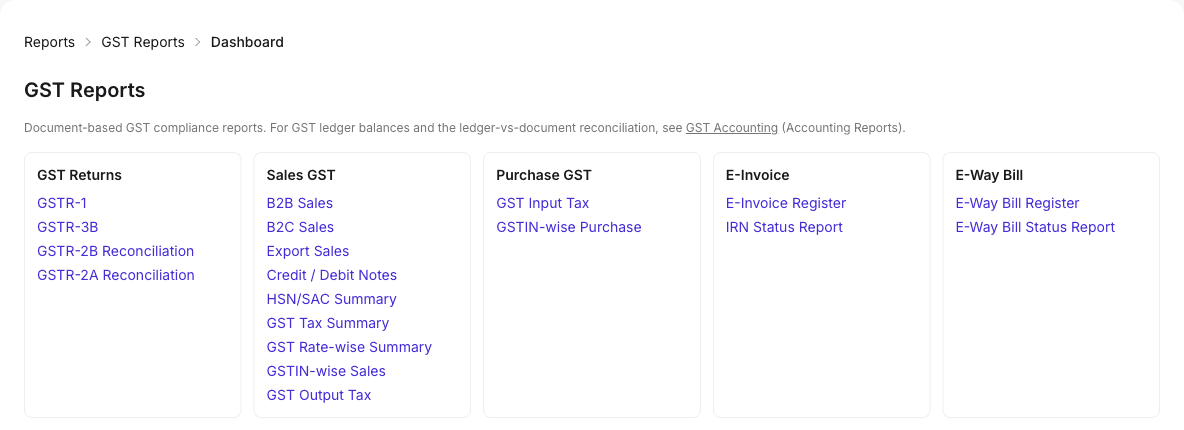
- Open GST Reports and choose a report, such as GSTR-1 or GSTR-3B.
- Select the financial year and period, and any filters.
- Apply and review the rows and totals.
- Export or download, for example the GSTR-1 JSON, after checking the figures.
Result: Reports are for preparation and review. A report or export does not file a return.
Reconcile GSTR-2B
- Download the GSTR-2A or 2B file from the GST portal.
- Open ITC Reconciliation, choose the period and upload the file.
- Review matched, unmatched and different lines, and follow up with suppliers.
Generate an e-Invoice and e-Way Bill
- Open the saved sales invoice.
- Choose to generate the e-Invoice. The IRN and acknowledgement are saved on the invoice.
- Then generate the e-Way Bill from the same invoice if the goods need one.
- Check the status in the e-Invoice or e-Way Bill register.
Result: Generating needs the right to create sales invoices; cancelling needs the right to cancel invoices.
Tips
- Do not retry e-Invoices for live documents unless you are sure the first attempt failed; check the register first.