
Everything Your Business Needs. Connected in One ERP.
Explore AYBN ERP features for sales, purchasing, inventory, GST, accounting, payments and business reporting.
AYBN ERP — From Lead to Ledger, Everything Connected.
Every capability, in one map.
Search for what you need, or browse every product area below. Each link jumps straight to that feature on this page.
Pick a topic or type to find a feature, then jump straight to it.
- Lead management
- Follow-ups
- Lead status
- Customer management
- Quotations
- Sales orders
- Delivery challans
- Sales invoices
- Sales returns
- Receivables
- Customer ledger
- Sales reports
- Lead sources and campaigns (upcoming)
- Lead assignment and duplicate checks (upcoming)
- Opportunities and sales pipeline (upcoming)
- Activities and reminders (upcoming)
- Quotation approvals and revisions (upcoming)
- Customer acceptance and PO (upcoming)
- Quotation to sales order (upcoming)
- Order approval and amendments (upcoming)
- Stock reservation for orders (upcoming)
- Customer 360° (upcoming)
- Sales targets (upcoming)
- Sales incentives (upcoming)
- WhatsApp order, delivery and invoice updates (upcoming)
Manufacturing
UpcomingService Management
Upcoming
From Lead to Ledger, Everything Connected.
AYBN ERP is not a set of separate modules. It keeps the relationships between your transactions, so a customer requirement can be followed through sales, delivery, billing, payment, accounting, GST and reporting.
- StepAvailable today
- StepUpcoming
- Not linked yet
Sales to reporting
- Lead
- Customer
- Quotation
- Customer PO (upcoming)
- Sales Order
- Delivery
- Invoice
- Payment
- Accounting
- GST
- Reporting & Analytics
Steps with a clock are upcoming.
Purchasing to accounting
- Supplier
- Purchase Order
- Goods Receipt
- Inventory
- Purchase Invoice
- Accounting
Inventory to production to sales
- Inventory
- Manufacturing (upcoming)
- Finished Goods (upcoming)
- Sales
- Invoice
- Accounting
Steps with a clock are upcoming.
See AYBN ERP in action
Walk through the connected flow with your own products, customers and documents.
Follow every customer from enquiry to payment.
Leads, customers, orders, deliveries, invoices and receipts work on the same customer and item records, and from the order onwards each sales document builds on the one before it.
Connected: Delivery challans take stock out of inventory, invoices post sales and GST to your books, and receipts settle the customer’s dues.
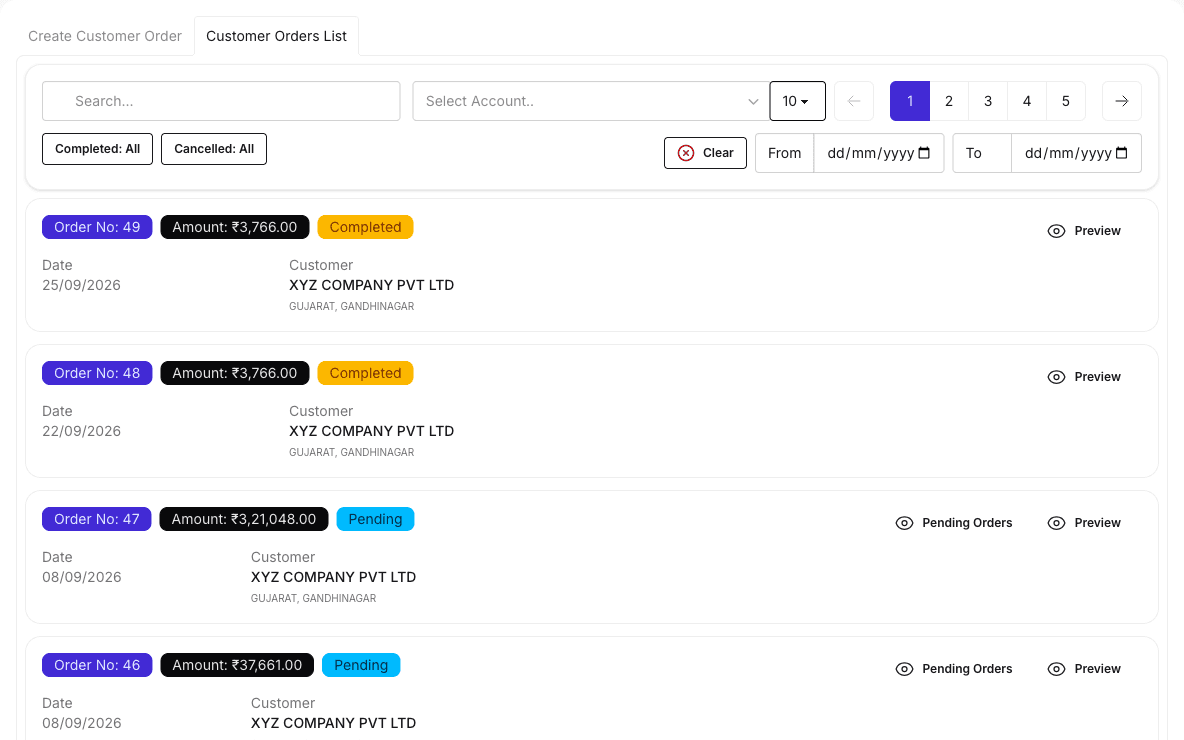
The sales flow
- Lead
- Follow-up
- Customer
- Opportunity (upcoming)
- Quotation
- Approval (upcoming)
- Customer PO (upcoming)
- Sales Order
- Delivery
- Invoice
- Payment
- Receivable
- Target & Incentive (upcoming)
Today the quotation is printed from the lead, and the sales order is entered separately using the same customer and item records. Opportunities, quotation approval, the customer’s PO, creating the order from the accepted quotation, and sales targets and incentives are upcoming. From the order onwards, every document carries its details into the next.
Lead management
Log every enquiry against a customer, with items, quantities, prices and the expected purchase date.
Learn more about Lead managementFollow-ups
Keep a dated follow-up log on each lead, with comments and the next expected purchase date.
Learn more about Follow-upsLead status
See which leads are open, closed or cancelled, and close or cancel a lead when the enquiry ends.
Customer management
One record per customer, with GSTIN, PAN, addresses, contacts and credit limit, used by every sales document.
Quotations
Add prices, tax and discounts to a lead and print it as a branded quotation.
Learn more about QuotationsSales orders
Record customer orders and see, line by line, how much is still to be delivered.
Learn more about Sales ordersDelivery challans
Deliver against the order in full or in parts. Each challan updates the pending quantity.
Learn more about Delivery challansSales invoices
Build one GST invoice from one or more challans without retyping lines, or bill directly.
Learn more about Sales invoicesSales returns
Record sales returns and credit notes, posted to the customer’s account and your books.
Receivables
See what each customer owes, with ageing, and settle invoices with receipts.
Learn more about ReceivablesCustomer ledger
Every invoice, receipt and note for a customer in one ledger.
Sales reports
Sales invoice registers, B2B and B2C sales, GSTIN-wise sales and income analysis.
Upcoming in CRM & Sales
UpcomingLead sources and campaigns
UpcomingRecord where each enquiry came from and which campaign brought it, and see which sources turn into orders.
Lead assignment and duplicate checks
UpcomingAssign leads to salespeople or teams with a full history, and spot likely duplicates by mobile, email or GSTIN.
Opportunities and sales pipeline
UpcomingTrack each opportunity through your own pipeline stages, with expected value, probability and closing date, in list or board view.
Activities and reminders
UpcomingPlan calls, meetings, demos and site visits, with reminders for overdue follow-ups and expiring quotations.
Quotation approvals and revisions
UpcomingSend quotations for approval by value, discount or margin, and keep every revision with its lines and terms.
Customer acceptance and PO
UpcomingRecord the customer’s acceptance and purchase order against the exact quotation revision they accepted.
Quotation to sales order
UpcomingCreate sales orders from an accepted quotation, in full or in parts, with quoted prices carried forward and changes flagged for approval.
Order approval and amendments
UpcomingApprove orders before they are confirmed, and amend confirmed orders with the reason and previous values kept.
Stock reservation for orders
UpcomingReserve stock for confirmed orders and see what is available to promise, including incoming purchases.
Customer 360°
UpcomingOne view of each customer’s opportunities, quotations, orders, deliveries, invoices, payments and timeline.
Sales targets
UpcomingSet targets by salesperson, team, territory or branch for order booking, sales, collections and margin, and track achievement.
Sales incentives
UpcomingCalculate incentives on orders, invoices, collections or margin using slabs, with approval, payout and adjustment for returns.
WhatsApp order, delivery and invoice updates
UpcomingCustomers will get order, delivery and invoice updates on WhatsApp, through an authorised WhatsApp Business provider.
Every purchase updates your stock, cost and books.
Order with approval, receive in parts, and enter the supplier’s invoice from what arrived. Stock, batch cost, GST and supplier dues follow from it.
Connected: Goods receipts add stock to the receiving store, and purchase invoices post the payable, GST and journal to your books.
The purchase flow
- Supplier
- Purchase Order
- Goods Receipt
- Purchase Invoice
- Payment
- Payable
A purchase invoice can also be entered directly, without an order or receipt.
Supplier management
Supplier records with GSTIN, addresses, contacts, credit days and bank accounts, shared by purchases, payments and ledgers.
Purchase orders
Purchase orders with maker-checker approval: the person who raised an order can never approve it. Issue, short-close or cancel.
Learn more about Purchase ordersGoods receipts
Receive an order in one or more lots. Over-receipts and reused supplier challan numbers are refused, and each line shows what is still to come.
Learn more about Goods receiptsPurchase invoices
Create the invoice from goods receipts or enter it directly. Stock, batch cost, GST and payables post from it, with due dates from credit days.
Learn more about Purchase invoicesPurchase returns
Purchase returns and debit notes, posted to the supplier’s account and your books, and cancelled with a reversal if needed.
Payables
See what you owe each supplier, with ageing, and pay against one or more bills, with approval and advances.
Supplier ledger
Every bill, payment and debit note for a supplier in one ledger.
Purchase reports
Purchase invoice registers and GST purchase reports, from the same invoices.
Upcoming in Procurement
UpcomingProcurement reports
UpcomingReports on open orders, receipts and what is still to be billed.
Know your stock, every store, every serial.
Every purchase, delivery and transfer moves stock in AYBN, by store, batch and serial number, so you can see what you have, where it is and what it is worth.
Connected: Purchases bring stock in, delivery challans take it out, transfers move it between stores, and stock value feeds your reports and balance sheet.
- Purchase invoiceAdds stock with batch and costStock in
- Stock transferFrom one store to anotherMoves
- Delivery challanAgainst the customer orderStock out
Stock, kept by store
- Stock by store
- Batches and serials
- Minimum stock levels
- Stock valuation
Multi-store stock
Keep stock by store or godown, with users limited to the stores they work in.
Batch management
Track stock and cost by batch, from opening stock and purchase through to delivery.
Learn more about Batch managementMultiple & alternate units of measurement
Trade in boxes, pieces, kg or metres; stock stays in the item’s base unit and every document keeps the unit and conversion it used.
Stock transfers
Move stock from one store to another with a transfer document.
Minimum stock levels
Set a minimum quantity per item and see which items have fallen below it.
Stock valuation
See the value of the stock you hold in the stock valuation report.
Item stock ledger
For any item and date range, see opening, in, out and running stock, document by document.
Item catalogue
Items with categories, HSN codes and images, and bulk import from a spreadsheet.
Upcoming in Inventory
UpcomingPhysical stock counts and adjustments
UpcomingCount stock by store, item and batch, approve the differences, and post the adjustment to the books.
Complete serial traceability
UpcomingTrace any serial number from the day you bought it to the customer who has it.
Learn more about Complete serial traceabilityStock-shortage alerts
UpcomingAlerts in AYBN when items run short.
Books that keep themselves up to date.
Accounting in AYBN is built from the same orders, deliveries, invoices and payments your team already records. Every sale, purchase and payment posts its own journal, so the books are current without re-entry.
Connected: Sales, purchases, returns, expenses and payments post here automatically, and the same entries feed GST reports and every financial statement.
From transaction to report
- Business Transaction
- Accounting Entry
- Ledger
- Financial Reports
Chart of accounts
Account groups and ledgers for your business, with opening balances and financial years.
Automatic journals
Invoices, purchases, receipts, payments, expenses and returns post their own journal entries.
Learn more about Automatic journalsJournal entries
Record adjustments as journal vouchers, and review them in the journal register.
Receipts and payments
Money in and out, by cash or bank, posted to the right ledgers as you record it.
Learn more about Receipts and paymentsExpenses
Record business expenses with the bill attached, posted to your books.
Customer, supplier and general ledgers
Account and general ledgers, day book, cash book and bank book from the same entries.
Trial balance
Check that your books balance for the period you choose.
Profit & loss
Profit and loss for any period, and a periodic P&L to compare months.
Balance sheet
A balance sheet built from the same posted entries.
Cash flow
Cash flow and fund flow statements for a clear cash position.
Accounting reports
Financial ratios and income and expense analysis, with export to Excel.
Upcoming in Accounting
UpcomingBank reconciliation
UpcomingMatch bank statement lines to the entries in your books.
Stock-adjustment and production cost postings
UpcomingStock adjustments and production costs will post to the books automatically.
GST built into every transaction.
GST in AYBN is built from the same orders, deliveries and invoices. Tax is applied as you bill, posted to your books, and reported from the same figures, so returns start from records you already keep.
Connected: Sales and purchase invoices carry the tax, journals post it, and GST reports, ITC and reconciliation read the same posted amounts.
How GST connects
- Sale or Purchase
- Invoice
- GST Applied
- Accounting
- GST Reports
GST calculations
The right CGST, SGST or IGST on every invoice, by place of supply.
Taxable and non-taxable supplies
Taxable, nil-rated and exempt sales are classified and reported separately.
e-Invoice
Generate and cancel e-Invoice IRNs from the invoice, through your GST Suvidha Provider (GSP), using your own GSP credentials.
e-Way Bill
Generate and cancel e-Way Bills from the invoice, through your GSP.
Input tax credit (ITC)
ITC from every purchase, with eligibility, IMS, Rule 42/43, reversals, reclaims and the 180-day rule.
Learn more about Input tax credit (ITC)GST reconciliation
Reconcile your purchases with GSTR-2A/2B by uploading the file from the GST portal.
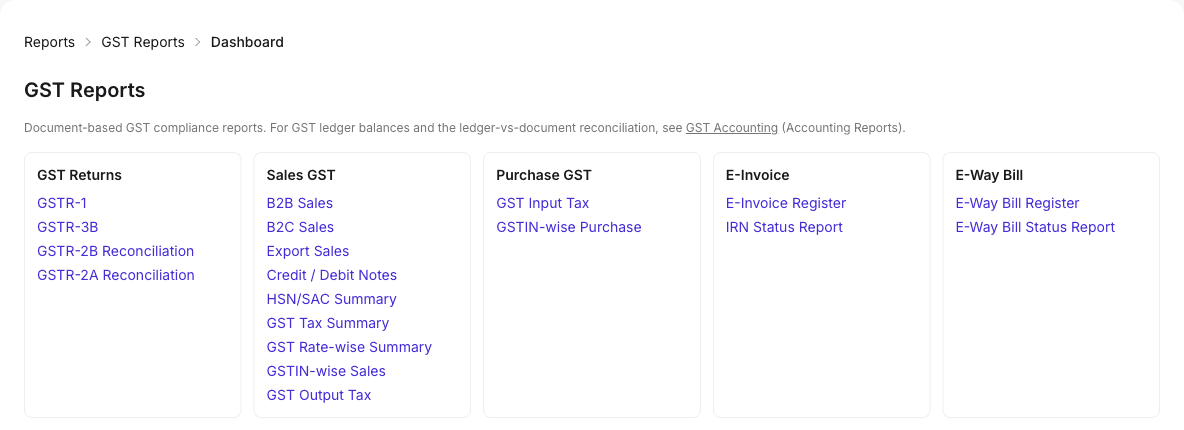
GST reports
GSTR-1, GSTR-3B, HSN summary, B2B, B2C, credit and debit notes, exports and rate-wise reports.
Learn more about GST reportsGSTR-1 preparation
Prepare GSTR-1 data and export portal-ready JSON to upload on the GST portal.
TDS and TCS
TDS/TCS sections on transactions, statutory payments and statutory reports.
Upcoming in GST & Compliance
UpcomingGST return filing
UpcomingReview, approve and file GST returns through an authorised GST filing provider, from the same books.
Compliance checks and due-date reminders
UpcomingDocument checks, TDS/TCS threshold checks and reminders before returns fall due.
Every rupee matched to the right invoice.
Record a receipt or payment once, settle one or more invoices with it, and see straight away who owes what.
Connected: Receipts and payments settle invoices and bills, update receivables, payables and party ledgers, and post their own journals.
How payments connect
- Invoice
- Payment
- Receivable / Payable
- Ledger
- Accounting
Bank accounts
Your company bank accounts and your customers’ and suppliers’ bank details in one place.
Customer receipts
Record a receipt once and settle one or more invoices with it, with advances kept.
Learn more about Customer receiptsSupplier payments
Pay suppliers against one or more bills, by cash or bank, with independent approval where your policy asks for it, and supplier advances applied to later bills.
Payment tracking
See how much of each invoice is paid and what is still due, with dues on your dashboard.
Cash and bank transfers
Move money between cash and bank accounts with transfer entries.
Cash and bank reporting
Cash book, bank book and cash flow from the same entries.
Upcoming in Banking & Payments
UpcomingBank statement import
UpcomingImport bank statements from CSV or Excel files.
Bank reconciliation
UpcomingMatch statement lines to receipts and payments, including partial and grouped matches.
Payment links and online collection
UpcomingSend a payment link and see the receipt settle the invoice, through a supported payment provider.
Connected bank accounts
UpcomingLink supported bank accounts for automatic sync.
Branded documents, from your own business email.
Connect your own business email server and give customers clean, branded documents. Invoice emails, in-app alerts and WhatsApp updates are upcoming, to cut down manual follow-up.
Connected: Documents are printed from the same orders, challans and invoices, with your branding from print setup.
Your own business email
Connect your business email server (SMTP), with TLS options and a built-in connection test.
Branded, print-ready documents
Quotations, orders, challans and invoices with your logo and layout, ready to print or save as PDF.
Upcoming in Communication & Notifications
UpcomingWhatsApp notifications
UpcomingInvoice, order, delivery and payment updates through an authorised WhatsApp Business provider, with customer opt-in and delivery status.
Invoice emails
UpcomingSend invoices from your own domain, with templates, preview, resend and delivery tracking.
In-app notifications and alerts
UpcomingAlerts for stock shortages, overdue payments, purchase delays and GST tasks.
Control who can do what as your team grows.
Roles and permissions decide who can view, create, edit, post, cancel or delete each kind of record. Purchase orders and supplier payments can go through maker-checker approval; approvals for more documents are upcoming.
Connected: The same permissions apply across sales, purchasing, inventory, accounting and GST, in every company you run.
Role-based permissions
Give each role view, create, edit or delete rights per screen, plus post, cancel and approve where a screen has them, checked on the server for every change.
Users and store access
Add users to your company, assign their role, and limit them to the stores they work in, including for purchase documents.
Several companies
Run several companies under one login, each with its own users, roles and books.
Purchase and payment approvals
Approval policies for purchase orders and supplier payments, with a named approver user or role. The requester can never approve their own request.
Protected documents
Invoices linked to challans, or with an e-Invoice IRN, are locked against edits that would break them.
Financial years and number series
Financial years and document number series per company keep numbering consistent.
Upcoming in Approvals & Workflows
UpcomingApproval workflows
UpcomingSet who approves more kinds of document, for example quotations and sales orders, with approval status on each document.
Audit trail
UpcomingSee who changed what, and when, in an audit trail of business changes.
Every document stays with the transaction behind it.
Quotations, orders, challans, invoices, returns and payments are numbered, printable documents linked to the records that created them.
Connected: Each document is created from the transaction it belongs to, so it always matches the books and GST reports.
Business documents
Numbered quotations, orders, challans, sales and purchase invoices, return notes and payment vouchers.
Print setup and branding
Choose print templates, layout and branding for your documents.
Linked documents
Invoices keep their links to the challans and orders behind them.
Expense attachments
Attach the bill image or PDF to each expense.
Purchase invoice attachments
Attach the supplier’s bill to the purchase invoice. Files are checked on upload and downloaded privately.
Upcoming in Document Management
UpcomingDocument attachments
UpcomingAttach files to customers, suppliers and more kinds of transaction, kept in private storage with authorised downloads.
Document history
UpcomingSee every change to a document in the audit trail.
Turn business data into decisions.
Reporting is the visibility layer across the whole ERP. Every report is built from the same connected records, so sales, stock, dues, GST and profit agree with each other.
Connected: Sales, purchases, stock, payments, accounting and GST all feed the same reports, which you can export to Excel.
From transactions to decisions
- Transactions
- Data
- Reports
- Business Decisions
Reports dashboard
Revenue, profit, receivables, payables, cash, bank and inventory value at a glance.
Learn more about Reports dashboardSales and customer reports
Sales registers, receivables with ageing and customer ledgers.
Purchase and supplier reports
Purchase registers, payables with ageing and supplier ledgers.
Inventory reports
Stock valuation, stock below minimum levels and item stock ledgers.
GST reports
GSTR-1, GSTR-3B, HSN, ITC and reconciliation reports.
Financial reports
Trial balance, profit and loss, balance sheet, cash flow and fund flow.
Business performance
Financial ratios, periodic P&L, and income and expense analysis.
Export to Excel
Export financial and GST reports to Excel.
Upcoming in Reporting & Analytics
UpcomingDrill-down to source documents
UpcomingOpen any total and go straight to the documents behind it.
Procurement, production and service reports
UpcomingReports on open purchase orders and receipts, and on production, service jobs and bank reconciliation as those areas ship.
Sales performance and forecasting
UpcomingSalesperson and manager views of pipeline, order backlog, targets, incentives and forecast, with CRM and conversion reports.
Production that will update stock and cost automatically.
Manufacturing is upcoming. It will turn raw materials into finished goods inside the same connected ERP, so material use, stock and production cost stay in step with your books.
How it will connect: Production will draw materials from inventory, add finished goods back to stock for sale, and post production cost to accounting.
How manufacturing will connect
- Inventory
- Production (upcoming)
- Finished Goods (upcoming)
- Sales
- Invoice
- Accounting
Steps with a clock are upcoming.
What it will do
UpcomingBills of materials
UpcomingVersioned bills of materials with components, outputs, scrap and yield.
Production orders and planning
UpcomingProduction orders linked to customer orders, with material reservations and shortage lists.
Material consumption
UpcomingIssue materials to production and return what is unused, with stock updated as you go.
Work in progress
UpcomingTrack partial completion, scrap and rework while production is under way.
Finished goods
UpcomingReceive finished goods into stock, with batch or serial numbers.
Production costing and reports
UpcomingMaterial, labour and overhead costs, planned versus actual, demand planning and production reports.
Every service job, from intake to invoice.
Service Management is upcoming. It will connect customer products, engineers, parts and billing, so every service job is tracked and billed.
How it will connect: Service jobs will use your customer records and stock of parts, and bill through invoices and payments that post to your books.
How service will connect
- Customer
- Service Job (upcoming)
- Parts & Billing (upcoming)
- Invoice
- Payment
Steps with a clock are upcoming.
What it will do
UpcomingService requests and job sheets
UpcomingNumbered job sheets with the product’s condition, accessories, photos and reported fault.
Engineer assignment
UpcomingAssign jobs to engineers by skills and availability.
Service status tracking
UpcomingFollow each job from received and diagnosis through approval, repair and testing to delivery.
Warranty and service history
UpcomingWarranty checks and service history by serial number.
Parts and service billing
UpcomingIssue parts to jobs and bill service charges through invoices and payments.
Service reports
UpcomingReports on service jobs, engineers and parts.
What's coming
These capabilities are upcoming. They are not available yet, and we do not publish dates until we can commit to them.
CRM & Sales
Upcoming- Lead sources and campaigns
- Lead assignment and duplicate checks
- Opportunities and sales pipeline
- Activities and reminders
- Quotation approvals and revisions
- Customer acceptance and PO
- Quotation to sales order
- Order approval and amendments
- Stock reservation for orders
- Customer 360°
- Sales targets
- Sales incentives
- WhatsApp order, delivery and invoice updates
Procurement
UpcomingInventory
UpcomingAccounting
UpcomingGST & Compliance
UpcomingBanking & Payments
UpcomingCommunication & Notifications
UpcomingApprovals & Workflows
UpcomingDocument Management
UpcomingReporting & Analytics
UpcomingManufacturing
UpcomingService Management
Upcoming
One Platform. One Connected Business.
Manage your business from lead to ledger with AYBN ERP.
Start your journey with a guided demo for your team.