
Bill What You Delivered, Without Typing It Twice.
Build GST invoices from one or more delivery challans, or bill directly. Tax is applied by place of supply, the sale posts to your books, and the customer’s balance is ready for collection.
AYBN ERP — From Lead to Ledger, Everything Connected.
- Challans selectedLines and quantities come across
- GST appliedCGST and SGST, or IGST, by place of supply
- Number assignedFrom the invoice book you choose
- Books updatedSales and tax journal posted
- Balance dueReady to settle with a receipt
Separate billing tools do not know what was delivered.
When invoices are typed from challans, every bill is a chance to get the quantity, price or tax wrong.
Retyping delivery details
Each invoice is keyed in again from the challans, line by line.
Wrong tax split
CGST, SGST and IGST are chosen by hand, and inter-state sales get the wrong one.
Invoice delays
Billing waits until someone collects all the challans for a customer.
Books that lag behind
Sales are entered into accounting later, so dues and GST figures are out of date.
Invoices built from deliveries, posted to the books as you save.
In AYBN ERP an invoice picks up the challans behind it, checks that it does not bill more than was delivered, applies GST by place of supply and posts its own journal. Payments then settle it against the customer’s account.
Receives: Delivery challans (with their items, quantities, store and batch), customer records and tax rates.
Feeds: The balance due goes to receivables and payments, sales and tax post to accounting, and GST reports read the same figures.
AYBN ERP — From Lead to Ledger, Everything Connected.
What you can do with Sales Invoicing in AYBN ERP
The capabilities that matter most day to day, each connected to the rest of the ERP.
Invoices from challans
Select one or more delivery challans and the invoice lines come across. You cannot bill more than was delivered.
Learn more about Invoices from challansDirect invoices
Bill without a challan when you need to; stock goes out with the invoice.
GST by place of supply
CGST and SGST, or IGST, applied to each invoice by place of supply.
e-Invoice and e-Way Bill
Generate and cancel IRNs and e-Way Bills from the invoice, through your GST Suvidha Provider (GSP), using your own GSP credentials.
Learn more about e-Invoice and e-Way BillNumber series
Invoice books keep numbering consistent within each financial year.
Automatic journals
Each invoice posts its sales and tax journal. Cancelling an invoice reverses its journal and stock.
Protected invoices
Invoices linked to challans, or with an e-Invoice IRN, are locked against edits that would break them.
Sales returns and credit notes
Record returns and credit notes, posted to the customer’s account and your books.
Branded invoice print
Print GST invoices with your logo and layout, or save them as PDF.
Upcoming in Sales Invoicing
UpcomingInvoice emails
UpcomingInvoices will be sent from your own domain, with templates, preview, resend and delivery tracking.
WhatsApp invoice updates
UpcomingCustomers will receive invoice updates on WhatsApp, through an authorised WhatsApp Business provider.
Payment links
UpcomingYou will be able to send a payment link with the invoice, through a supported payment provider.
See Sales Invoicing in a guided demo
We will walk through it with your own products, customers and documents.
From delivery to the books in one save.
The invoice sits in the middle of the sales flow: it takes what was delivered and hands the balance to collections and the tax to your books.
The Sales Invoicing workflow
- Sales Order
- Delivery Challans
- Sales Invoice
- e-Invoice / e-Way Bill
- Payment
- Accounting & GST
Sales order
The order records what the customer wants.
Delivery challans
Goods leave in one or more challans; stock goes out as they do.
Sales invoice
One invoice picks up one or more challans, with GST applied by place of supply.
e-Invoice and e-Way Bill
Generate the IRN and e-Way Bill from the invoice through your GSP.
Payment
A receipt settles the invoice, fully or in part, and the customer ledger updates.
Accounting and GST
The sales and tax journal is already posted, and GST reports read the same figures.
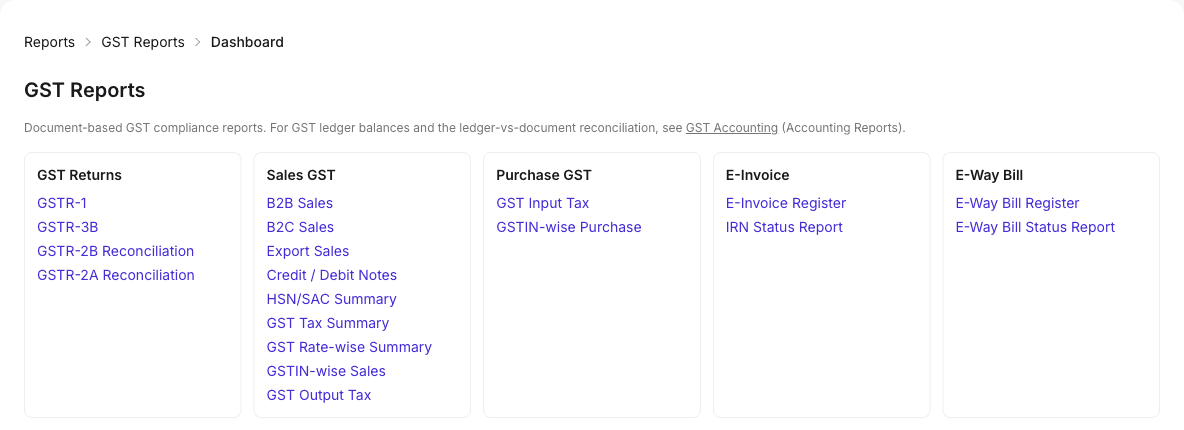
GST registers built from your invoices.
Sales invoices feed GSTR-1, B2B and B2C registers, HSN summaries and e-Invoice registers directly.
What it means for your business
Reduce billing errors
Lines come from the challans, so quantities match deliveries.
Speed up invoicing
Bill several challans in one invoice, in one step.
Get GST right
Tax is split by place of supply on every invoice.
Books that are current
Every invoice posts its own journal as you save it.
Cleaner collections
Each invoice’s balance is ready to settle with a receipt.
Practical guides related to Sales Invoicing
- Article · Sales & CRM
Sales operations: always knowing what is pending
The three pending lists every sales team needs (to deliver, to bill and to collect) and how to keep them accurate without manual registers.
4 min read - Article · Sales & CRM
Delivery challans: when to use one and how it links to the invoice
What a delivery challan is, when goods generally move on one under GST, what it should contain, and how challans connect to invoices and stock.
6 min read
Sales Invoicing: common questions
Can I make one invoice from several delivery challans?
Yes. Select one or more challans for the customer and the invoice lines come across. AYBN ERP checks that the invoice does not bill more than was delivered.
Can I invoice without a delivery challan?
Yes. You can bill directly; in that case stock goes out with the invoice.
How does AYBN ERP decide between CGST/SGST and IGST?
By place of supply. Intra-state sales get CGST and SGST, and inter-state sales get IGST.
Does AYBN ERP generate e-Invoices and e-Way Bills?
Yes, through a GST Suvidha Provider (GSP) using your own GSP credentials. You can generate and cancel IRNs and e-Way Bills from the invoice.
Can I change an invoice after it is created?
Invoices that other records depend on are protected: for example, invoices linked to challans, with an e-Invoice IRN, or with returns against them cannot be edited. You can cancel an invoice, which reverses its stock and journal, and enter a corrected one.
Can I email invoices to customers from AYBN ERP?
Not yet. Invoice emails from your own domain are upcoming. Today you can print invoices or save them as PDF to send.
See How AYBN ERP Can Connect This Workflow
Bring your sales, inventory, accounting, GST and payments together in one connected ERP.