
Turn Business Data Into Decisions.
Every report in AYBN ERP is built from the same connected records, so sales, stock, dues, GST and profit agree with each other.
AYBN ERP — From Lead to Ledger, Everything Connected.
- SalesSales registers and income analysis
- OrdersCompleted and pending orders
- OutstandingReceivables and payables
- PaymentsCash book and bank book
- InventoryStock valuation and minimum stock
- CustomersCustomer ledgers and dues
- GSTGSTR-1, GSTR-3B and ITC
- ProfitabilityProfit and loss, periodic P&L
- Business performanceRatios, balance sheet and fund flow
Reports collected from five systems never agree.
When each department keeps its own numbers, management spends its time reconciling instead of deciding.
Lack of visibility
Profit, dues and stock are only known after someone compiles them.
Conflicting numbers
Sales, accounts and GST figures come from different sources.
Spreadsheet assembly
Monthly MIS is rebuilt by hand from exports.
One set of records, every report.
In AYBN ERP sales, purchases, stock, payments, accounting and GST all feed the same reports, so the numbers agree and are current.
Receives: Every posted transaction: invoices, bills, challans, transfers, payments, expenses and journals.
Feeds: Financial statements, GST returns data, dues with ageing, stock valuation and Excel exports.
AYBN ERP — From Lead to Ledger, Everything Connected.
What you can do with Reports in AYBN ERP
The capabilities that matter most day to day, each connected to the rest of the ERP.
Reports dashboard
Revenue, profit, receivables, payables, cash, bank and inventory value at a glance.
Financial reports
Trial balance, profit and loss, balance sheet, cash flow and fund flow.
Books and ledgers
Day book, cash book, bank book, general and account ledgers, journal register.
Receivables and payables
What customers owe and what you owe, with ageing.
GST reports
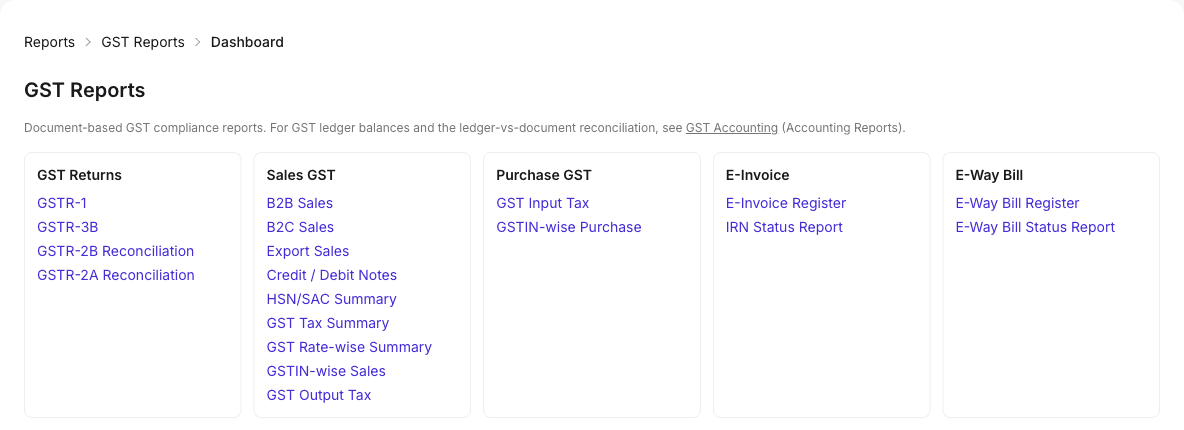
GSTR-1, GSTR-3B, HSN, B2B, B2C, ITC and reconciliation reports.
Inventory reports
Stock valuation, stock below minimum levels and item stock ledgers.
Business performance
Financial ratios, periodic P&L, and income and expense analysis.
Export to Excel
Export financial and GST reports to Excel.
Upcoming in Reports
UpcomingDrill-down to source documents
UpcomingYou will open any total and go straight to the documents behind it.
Procurement, production and service reports
UpcomingReports on open purchase orders and receipts, and on production, service jobs and bank reconciliation as those areas arrive.
See Reports in a guided demo
We will walk through it with your own products, customers and documents.
From transactions to decisions.
Reports are not a separate step: they read the entries your team creates every day.
The Reports workflow
- Transactions
- Posted Entries
- Reports
- Business Decisions
Transactions
Invoices, bills, challans, payments and expenses are recorded by the team.
Posted entries
Each one posts its stock movement and journal.
Reports
Financial, GST, stock and dues reports read the same entries.
Business decisions
Management works from one set of numbers.
GST and financial reports side by side.
Reports are grouped so the right one is easy to find, and every one can be read straight from the system.
What it means for your business
Give management better visibility
Profit, cash, dues and stock in one place.
Numbers that agree
Every report reads the same connected records.
Less spreadsheet work
Export to Excel only when you need to share.
Practical guides related to Reports
- Article · Accounting
The reports a business owner should read every month
A short list of monthly reports that tell a business owner how the business is really doing: profit, cash, dues, stock and GST.
5 min read - Article · Inventory
Inventory valuation methods: FIFO, weighted average and batch cost
How the main stock valuation methods work, why the method changes your profit and closing stock, and what to check so your stock value can be trusted.
6 min read - Article · GST
GST accounting: how output tax and input tax credit flow through your books
How GST is recorded in the books: output tax on sales, input tax credit on purchases, CGST, SGST and IGST ledgers, set-off, and agreeing with returns.
7 min read
Reports: common questions
Which reports does AYBN ERP include?
Financial statements (trial balance, P&L, balance sheet, cash flow, fund flow), books and ledgers, receivables and payables with ageing, GST reports, stock valuation and minimum stock, ratios and income and expense analysis.
Is there a reports dashboard?
Yes. The reports dashboard shows revenue, profit, receivables, payables, cash, bank and inventory value at a glance.
Can I export reports to Excel?
Yes. Financial and GST reports can be exported to Excel.
Do sales, GST and accounting reports agree?
They read the same posted transactions, so the figures come from one source rather than separate systems.
Can I click a total to see the documents behind it?
Not yet. Drill-down from report totals to source documents is upcoming.
See How AYBN ERP Can Connect This Workflow
Bring your sales, inventory, accounting, GST and payments together in one connected ERP.