
Enter the Supplier Bill Once. Stock, Tax and Books Follow.
Create a supplier’s invoice from the goods you received, or enter it directly. Stock, batch cost, GST, the supplier’s payable and the journal all post from it when you save.
AYBN ERP — From Lead to Ledger, Everything Connected.
- StockInto the store, or already in from the receipt
- Batch and costBatch number and cost per unit
- GSTCGST and SGST, or IGST
- Supplier payableWith a due date from credit days
- BooksPurchase and tax journal
One supplier bill, entered three times.
In disconnected tools the same bill is typed into the stock register, the accounts and the GST working.
Duplicate entry
Stores, accounts and the GST team each enter the same bill.
The same bill entered twice
A supplier’s invoice is booked a second time and paid twice.
Unknown stock cost
Cost per batch is not recorded, so margins and stock value are guesses.
Unclear supplier dues
Nobody is sure which bills are paid, part-paid or overdue.
The purchase invoice is where stock, cost and tax meet.
In AYBN ERP a purchase invoice is posted when you save it. Created from goods receipts, it bills what arrived without adding the stock again; entered directly, it adds the stock itself. Either way it records the batch cost, GST and the supplier’s payable, and posts its own journal.
Receives: Goods receipts against purchase orders, supplier records with credit days, and your item catalogue with tax rates.
Feeds: Stock goes into inventory, payables go to supplier payments and ageing, the journal posts to accounting, and GST purchase registers and GSTR-3B inward figures read the same invoice.
AYBN ERP — From Lead to Ledger, Everything Connected.
What you can do with Purchase Invoicing in AYBN ERP
The capabilities that matter most day to day, each connected to the rest of the ERP.
Invoices from goods receipts
Create the invoice from the receipts against a purchase order. The stock already received is not added again.
Direct purchase invoices
Record a supplier’s bill without an order. Saving posts it: stock, journal, GST and payable together.
Batch numbers and cost
Each line adds stock to the store you choose, with its batch and cost per unit.
Learn more about Batch numbers and costCGST, SGST and IGST
CGST and SGST within the state, IGST across states, and nil-rated lines at 0 %.
Due dates from credit days
The due date comes from the supplier’s credit days unless you enter one.
Duplicate and date checks
The same supplier invoice number cannot be entered twice for one supplier, and invoices cannot be dated after today or outside the financial year.
Cancel and reverse
Posted invoices are not edited or deleted. Cancelling reverses the journal, stock and GST, keeps the original and is written to the audit log.
Purchase returns and debit notes
Draft, post and, if needed, cancel returns and debit notes. Returns take stock out of the original batch; debit notes reverse the GST.
Payments, advances and payables
Pay against one or more bills, apply supplier advances, and check payables ageing against the supplier ledger.
Learn more about Payments, advances and payablesAttachments and print
Attach the supplier’s bill to the invoice, with private download, and print the invoice or save it as PDF.
See Purchase Invoicing in a guided demo
We will walk through it with your own products, customers and documents.
From goods receipt to settled payable.
Start from goods received against a purchase order, or enter the supplier’s bill directly.
The Purchase Invoicing workflow
- Purchase Order
- Goods Receipt
- Purchase Invoice
- Return / Debit Note
- Supplier Payment
- Supplier Ledger
Goods receipt
Goods received against an issued purchase order are already in stock.
Purchase invoice
Create the invoice from the receipts, or directly. Saving posts stock, GST, the payable and the journal.
Corrections
To correct a posted invoice, cancel it (the journal, stock and GST are reversed) and enter it again.
Return or debit note
Post a return or debit note against the invoice; it can be cancelled with a reversal.
Supplier payment
Pay against one or more bills, after approval where your policy asks for it, or apply an advance.
Supplier ledger
Every bill, payment and debit note appears in the supplier’s ledger and the payables report.
Posted means posted.
A purchase invoice posts when you save it, so the rules around it keep your stock, GST and payables honest.
- The same supplier invoice number cannot be entered twice for one supplier, whatever the case or spacing.
- Invoices cannot be dated after today, or outside the financial year.
- Posted invoices cannot be edited or deleted; corrections go through cancel and re-enter.
- Cancelling needs its own permission, and every cancellation is written to the audit log.
- A return cannot take back more than was bought, and pressing post twice posts once.
- Posted invoiceStock, GST, payable and journal
- CancelNeeds the cancel permission
- ReversalJournal, stock and GST reversed
- Original keptMarked cancelled, in the audit log
- Re-enterThe corrected invoice
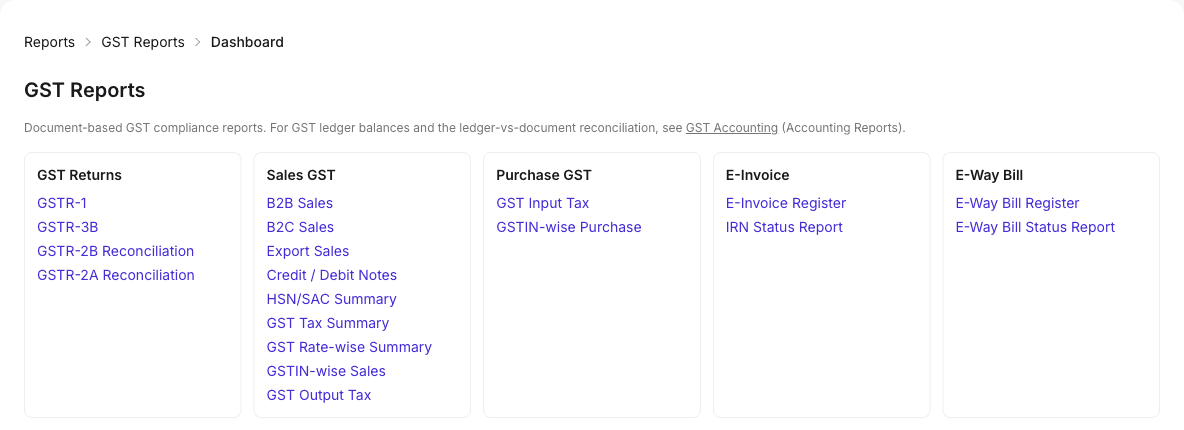
Purchases that feed GST from the same bill.
GST purchase registers and the GSTR-3B inward figures read the purchase invoices you record.
What it means for your business
Reduce manual data entry
One entry updates stock, cost, GST, dues and the books.
Know your true cost
Every batch carries the cost it was bought at.
No bill booked twice
Duplicate supplier invoice numbers are refused for each supplier.
Pay suppliers on time
Due dates and payables ageing show what is due and when.
Practical guides related to Purchase Invoicing
- Article · Procurement
Purchase operations: getting stock, cost and ITC right
How to record supplier invoices so that stock, item cost, supplier dues and input tax credit all agree, and how to handle purchase returns.
5 min read - Guide · Procurement
The purchase order process: from requirement to supplier payment
A step-by-step purchase order process for growing businesses: raising and approving orders, receiving goods, matching the supplier bill, and paying on time.
6 min read
Purchase Invoicing: common questions
Can I create a purchase invoice from a goods receipt?
Yes. Create the invoice from the goods receipts against a purchase order. The stock was added when the receipt was posted, so it is not added again.
Can I enter a supplier bill without a purchase order?
Yes. A direct purchase invoice adds the stock itself. It is posted when you save it, with the journal, GST and the supplier’s payable.
Can I edit or delete a posted purchase invoice?
No. To correct it, cancel it and enter it again. Cancelling reverses the journal, stock and GST, keeps the original marked cancelled, and needs the cancel permission.
What stops a supplier bill being entered twice?
AYBN ERP refuses the same supplier invoice number twice for one supplier, ignoring differences in case and spaces.
How is the due date set?
From the supplier’s credit days, unless you enter a due date yourself.
Can I record batch numbers on purchases?
Yes. Enter the batch number on the line; if you leave it blank, a default batch is used. The batch keeps its cost per unit.
Can I pay several supplier bills at once?
Yes. A supplier payment can settle one or more bills, fully or in part. Payments can go through approval before they are posted, and an advance can be applied to a later bill.
See How AYBN ERP Can Connect This Workflow
Bring your sales, inventory, accounting, GST and payments together in one connected ERP.