
Turn Every Sales Order Into a Connected Business Workflow.
Record customer orders, deliver them in full or in parts, see what is still pending, and bill from the deliveries, with stock, invoices, payments and accounts kept in step.
AYBN ERP — From Lead to Ledger, Everything Connected.
Orders get confusing the moment they are delivered in parts.
When orders, deliveries and bills live in different places, nobody can say what is still owed to the customer.
Order status confusion
Sales, stores and accounts each have a different idea of which orders are complete.
Partial deliveries
An order shipped in three lots is tracked on paper, and the balance is easy to lose.
Pending quantities
Working out what is still to be delivered means adding up challans by hand.
Billing errors
Invoices are typed again from challans, so quantities and prices drift.
Inventory mismatches
Goods leave the godown before the stock records catch up.
One order, followed through every delivery, invoice and payment.
In AYBN ERP the order is the anchor. Delivery challans are raised against it, each one updates the pending quantity and takes stock out, and invoices are built from the challans. The order completes itself when nothing is left to deliver.
Receives: Customer records, your item catalogue with prices and tax, and stock by store and batch.
Feeds: Delivery challans take stock out against the order, invoices are built from the challans, and receipts settle the invoices.
AYBN ERP — From Lead to Ledger, Everything Connected.
What you can do with Sales Orders in AYBN ERP
The capabilities that matter most day to day, each connected to the rest of the ERP.
Customer orders
Record the order with customer, items, quantities, prices, discounts and tax.
Pending quantity per line
See, line by line, how much has been delivered and how much is still pending.
Partial deliveries
Raise as many delivery challans as you need against one order, in full or in parts.
Automatic completion
An order is marked complete when every line is delivered. Cancelled challans are left out.
Completed and pending views
See completed, pending and cancelled orders, with their counts and value.
Order and pending prints
Print the order, or a pending-quantity statement of what is still to be delivered.
Bill from challans
Build one GST invoice from one or more challans, without typing the lines again.
Learn more about Bill from challansDeliver from any store
Each challan line picks the store and batch the goods leave from.
Upcoming in Sales Orders
UpcomingOrders from accepted quotations
UpcomingCreate the order from an accepted quotation and the customer’s PO, in full or in parts, with quoted prices carried forward.
Order approval and amendments
UpcomingApprove orders before they are confirmed, and amend confirmed orders with the reason and previous values kept.
Stock reservation
UpcomingReserve stock for confirmed orders and see what is available to promise, including incoming purchases.
WhatsApp order and delivery updates
UpcomingCustomers will get order and delivery updates on WhatsApp, through an authorised WhatsApp Business provider.
See Sales Orders in a guided demo
We will walk through it with your own products, customers and documents.
From order to payment, one connected chain.
Every document after the order is created from the one before it, so quantities and values flow forward instead of being typed again.
- StepAvailable today
- StepUpcoming
- Not linked yet
The Sales Orders workflow
- Quotation
- Customer PO (upcoming)
- Sales Order
- Partial Delivery
- Pending Quantity
- Final Delivery
- Invoice
- Payment Collection
Today the order is entered separately, using the same customer and item records. Recording the customer’s PO and creating the order from the accepted quotation are upcoming.
Sales order
Record what the customer ordered: items, quantities, prices and tax.
Partial delivery
Raise a delivery challan for what you can send now. Stock leaves the chosen store and batch.
Pending quantity
The order shows, per line, what has been delivered and what is still pending.
Final delivery
The last challan clears the balance and the order is marked complete.
Invoice
Build one GST invoice from one or more challans. Lines and quantities come across.
Payment collection
Record the receipt and settle one or more invoices; the customer ledger updates.
Always know what is still to be delivered.
Each challan raised against the order reduces its pending quantity, line by line. When nothing is pending, the order completes itself.
- Delivered and pending quantity on every order line
- Any number of challans against one order
- Cancelled challans do not count towards delivery
- A pending-quantity print to share with the customer or the godown
| Document | Delivered | Pending |
|---|---|---|
| Sales order | — | 100 |
| Delivery challan 1 | 60 | 40 |
| Delivery challan 2 | 25 | 15 |
85 of 100 delivered. The order completes itself when the last 15 are delivered.
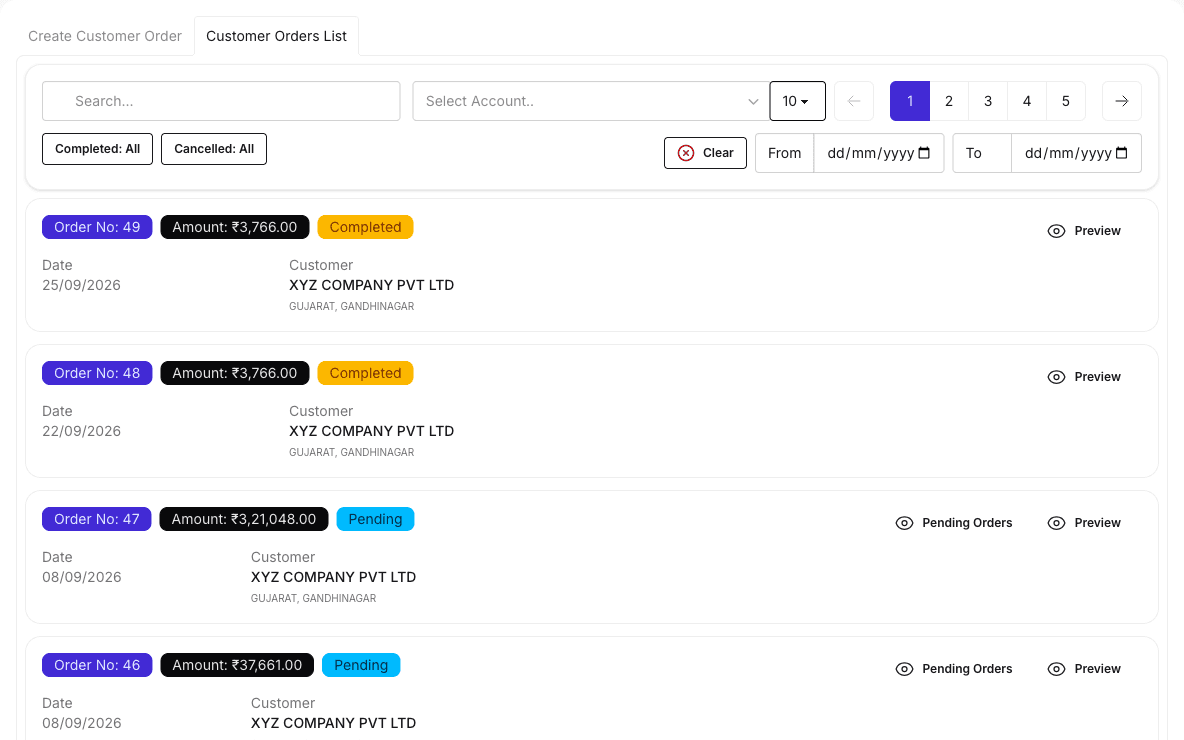
Completed and pending orders at a glance.
The order list separates completed, pending and cancelled orders, so the team works from the same picture.
- Sales orderCustomer, items and quantities
- Delivery challanDelivered quantity, store and batch
- Sales invoiceLines from one or more challans
- ReceiptSettles the invoice balance
- BooksSales, tax and receipt journals
Diagram of what each document passes to the next. See the real screens in a guided demo.
What it means for your business
Track pending quantities accurately
Pending quantities come from the challans themselves, not from a spreadsheet.
Improve order visibility
Sales, stores and accounts see the same order status.
Reduce billing errors
Invoices are built from what was actually delivered.
Speed up invoicing
One invoice can carry several challans, with no lines typed again.
Keep stock right
Each challan takes stock out of the store and batch the goods left from.
Follow up payments
Receipts settle invoices and show what each customer still owes.
Practical guides related to Sales Orders
- Guide · Sales & CRM
Managing sales orders, partial deliveries and billing
How to keep track of what each customer ordered, what has been delivered and what is still to bill, when orders are delivered in parts.
6 min read - Article · Sales & CRM
Sales operations: always knowing what is pending
The three pending lists every sales team needs (to deliver, to bill and to collect) and how to keep them accurate without manual registers.
4 min read - Article · Sales & CRM
Quotation vs sales order: what each document does
A quotation is an offer; a sales order records what the customer has agreed to buy. How the two differ, what each should contain and how one leads to the other.
5 min read
Sales Orders: common questions
What is sales order management software?
Sales order management software records what customers have ordered and tracks each order through delivery, billing and payment. In AYBN ERP the order is linked to its delivery challans and invoices, so you can always see what is pending.
Can AYBN ERP convert quotations into sales orders?
Not today. The sales order is entered separately, using the same customer and item records. From the order onwards, delivery challans and invoices carry the details forward.
Can AYBN ERP handle partial deliveries?
Yes. Raise as many delivery challans as you need against one order. Each challan reduces the pending quantity, and the order is marked complete when nothing is left to deliver.
Can I track pending quantities?
Yes. Every order line shows its delivered and pending quantity, and you can print a pending-quantity statement for the order.
Does the sales order connect with inventory?
Yes, through delivery challans. Each challan takes the delivered quantity out of the store and batch you choose. The order itself does not reserve stock.
Can sales orders be converted into invoices?
Yes, through their delivery challans. Build one GST invoice from one or more challans without typing the lines again. You can also bill directly without a challan.
Can I track customer payments?
Yes. Record a receipt once and settle one or more invoices with it. Receivables with ageing and the customer ledger show what is still due.
Will sales orders support approval and stock reservation?
Yes, both are upcoming, together with creating orders from accepted quotations. Today an order is recorded directly and stock moves when a delivery challan is raised.
Does AYBN ERP support multiple locations?
Yes. Stock is kept by store or godown, each challan line picks the store it ships from, and users can be limited to the stores they work in. You can also run several companies under one login.
See How AYBN ERP Can Connect This Workflow
Bring your sales, inventory, accounting, GST and payments together in one connected ERP.